
How to Install Upgrades in Lightyear Frontier
Use the 1.0 Mech Depot upgrade paths, equip Mod Chips and distinguish equipment stats from appearance changes.
Upgrade the relevant slot in the Mech Depot
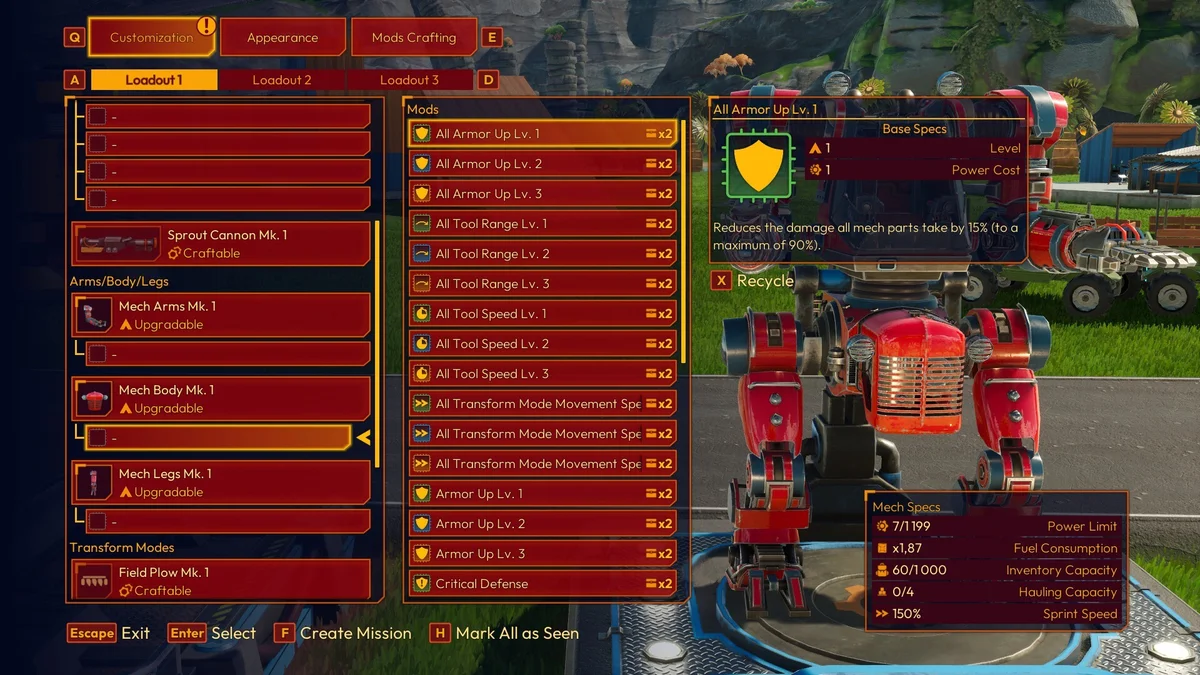
In 1.0, tools, body parts and transform modes use dedicated upgrade paths. Select the relevant equipment in the Mech Depot and inspect its next upgrade rather than looking for an old Parts Crafting workflow that requires crafting and swapping every tier manually.
A base upgrade, a Mod Chip and an appearance choice are three different changes. Decide which result you want before spending materials.
A practical installation sequence
- Open the depot's customization interface.
- Select the tool, part or mode whose performance you want to improve.
- Read the next upgrade's requirements and benefits.
- Complete the available upgrade when you have the required progression and materials.
- Select the appropriate Mod slots for any additional chips you want to equip.
- Leave the menu and test the relevant tool on a familiar task.
If the upgrade is locked, identify the stated requirement. Having enough metal does not override an unfinished progression condition.
Check the ability you are trying to gain
Main tool secondary abilities now arrive through tool progression. For example, the Seed Shooter gains Lock-On from Mk. 2, while Seed Stacking arrives later at Mk. 4. If an old guide tells you to find a separate chip for an ability, inspect the current tool path first.
For a performance change, compare the displayed stats before and after. For an appearance change, inspect the Appearance section. A new visual style does not automatically mean the tool's working tier changed.
Why an installed change may seem ineffective
Check whether the chip belongs to the equipment you are using and whether its effect matches the action you are testing. A movement improvement will not necessarily help a stationary crafting task, and a specialized farming effect may be invisible while merely walking around.
Change one part of the build at a time. Test one row, one gathering target or one short route so the result is easy to interpret.
Returning from an older save
The 1.0 equipment conversion is not intended to wipe progression: existing Mods carry over and parts are matched to the highest tier reached. Inspect the new arrangement before recrafting everything from memory.
Use skill-tree planning for priorities, Mods for chip choices, or fuel selection when the mech's current performance still feels wrong.